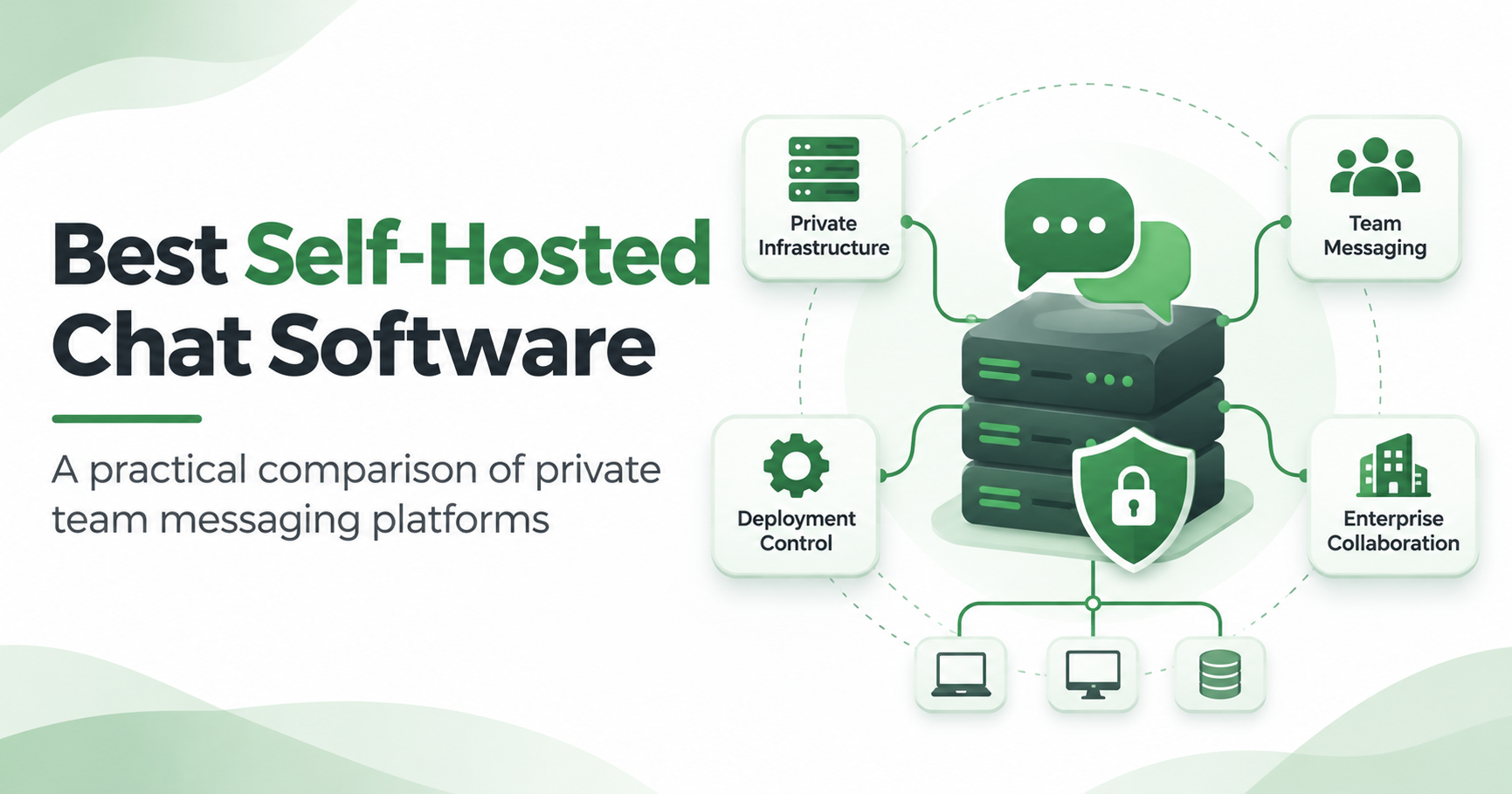
Self-hosted chat software lets organizations run team messaging on servers they control instead of relying entirely on a third-party cloud service. Popular options include Mattermost, Rocket.Chat, Zulip, Element, TrueConf Server, Secumeet, and Nextcloud Talk. However, they solve different problems, from developer collaboration and federated messaging to private enterprise communication with integrated video meetings.
The important distinction is that self-hosted does not necessarily mean open source, end-to-end encrypted, or completely offline. A messaging server can run inside your network while still depending on external services for licensing, notifications, integrations, or certain calling features.
This guide compares seven self-hosted chat platforms by deployment model, communication features, administrative requirements, and practical limitations.
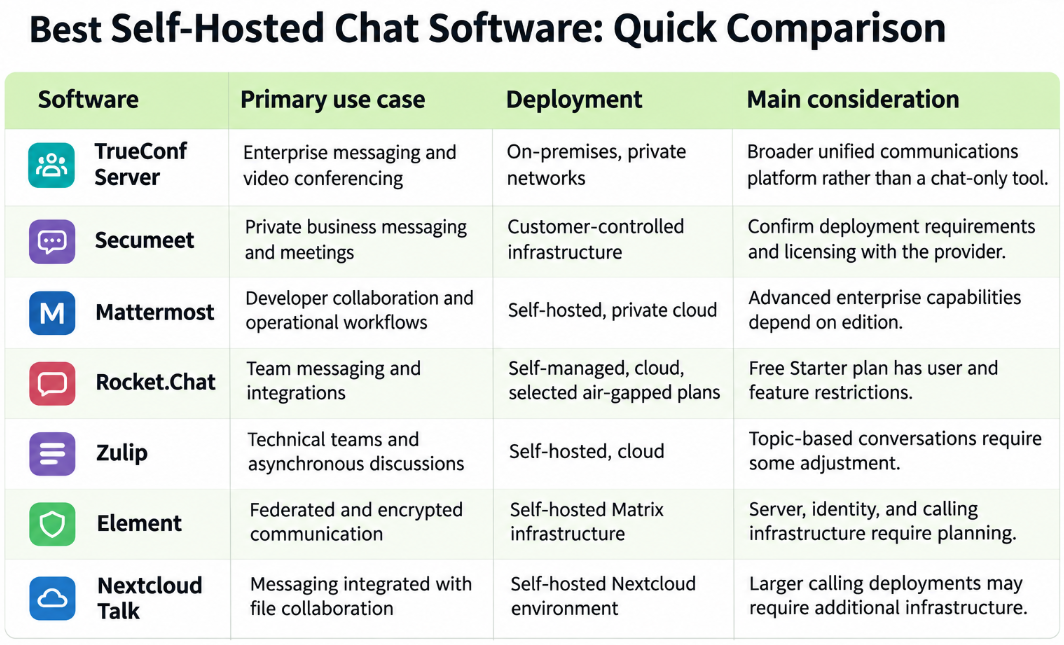
Best Self-Hosted Chat Software List
1. TrueConf Server: Self-Hosted Chat With Integrated Video Conferencing
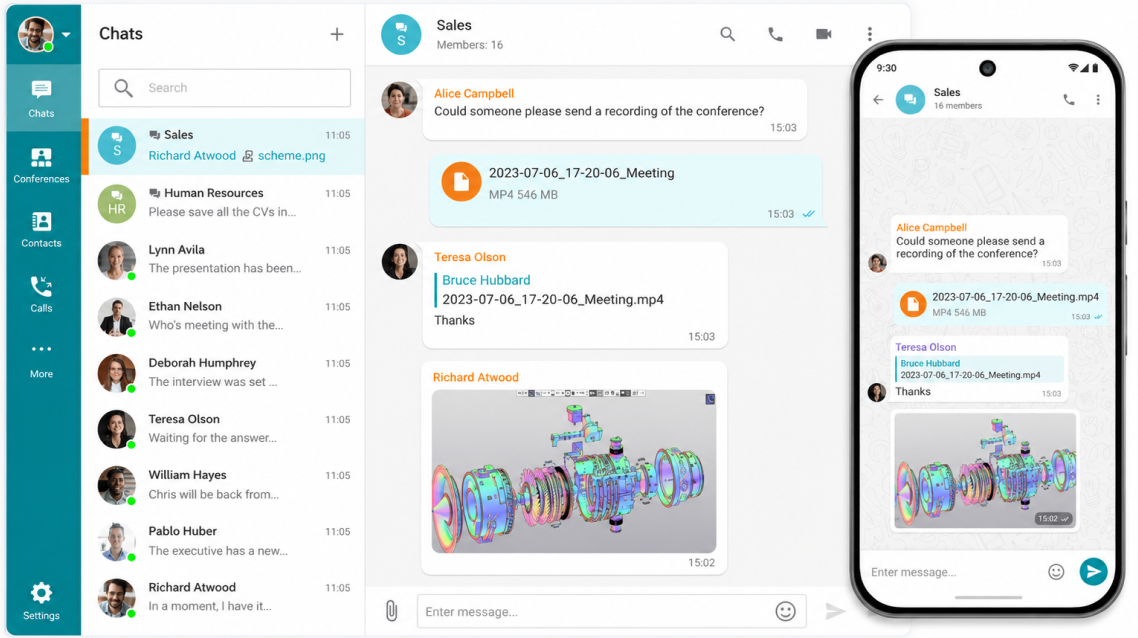
TrueConf Server combines corporate messaging, file sharing, voice calls, and video conferencing in a self-hosted communication platform.
Unlike a standalone team messenger, TrueConf is designed for organizations that need multiple communication services running within the same enterprise infrastructure.
It supports deployment on Windows and Linux servers and can operate across LAN, VPN, and isolated corporate networks without requiring public internet connectivity for internal communications.
Key features:
- Personal and group chats with message history.
- File sharing and synchronized conversations.
- Integrated video conferencing with 4K Ultra HD support.
- Conferences supporting up to 2,000 participants, subject to configuration and licensing.
- Active Directory and LDAP integration.
- SIP/H.323 interoperability for existing communication equipment.
- Centralized administration and access management.
When to choose TrueConf
TrueConf is particularly relevant for enterprises operating private networks, government organizations, educational institutions, and companies replacing separate messaging and video meeting systems.
For example, a manufacturing company with several locations connected through a private VPN could use one platform for employee messaging and internal video meetings without routing those conversations through a public SaaS provider.
Considerations: TrueConf covers more than messaging, so organizations seeking only a lightweight, developer-focused chat server may prefer a simpler application. Administrators also need to evaluate media traffic, server capacity, and licensing requirements.
2. Secumeet: Private Messaging and Enterprise Collaboration
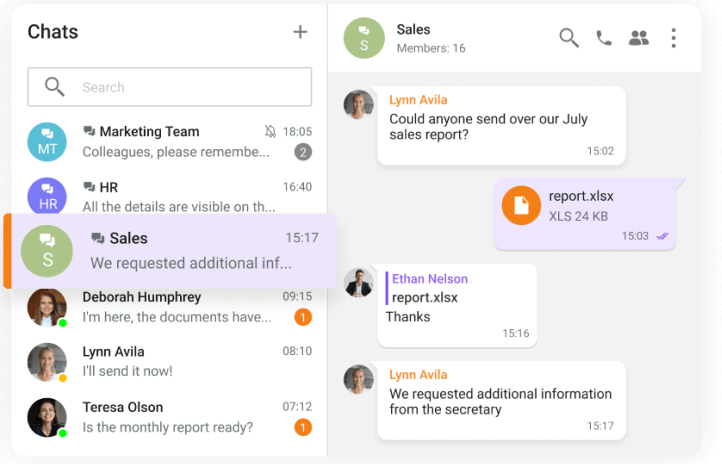
Secumeet focuses on private business communication, combining persistent messaging with video meetings and collaboration capabilities.
Its customer-controlled infrastructure approach makes it relevant to organizations that want to manage where their communication environment operates rather than depend exclusively on a shared public-cloud service.
Key features:
- Private business messaging and group communication.
- Video and audio meeting capabilities.
- File sharing and collaboration.
- Organization-controlled deployment options.
- Enterprise-oriented access and infrastructure management.
When to choose Secumeet
Secumeet is worth evaluating when private messaging is part of a broader enterprise communication requirement, particularly where video collaboration and control over communication infrastructure are important.
It may suit organizations that want to reduce reliance on externally hosted workplace communication services.
Considerations: Before deployment, request technical documentation covering the supported operating systems, server architecture, identity integrations, external dependencies, encryption model, licensing, and administrative features. These details should be verified for the proposed edition rather than assumed from general product descriptions.
3. Mattermost: Team Messaging for Developers and Operations
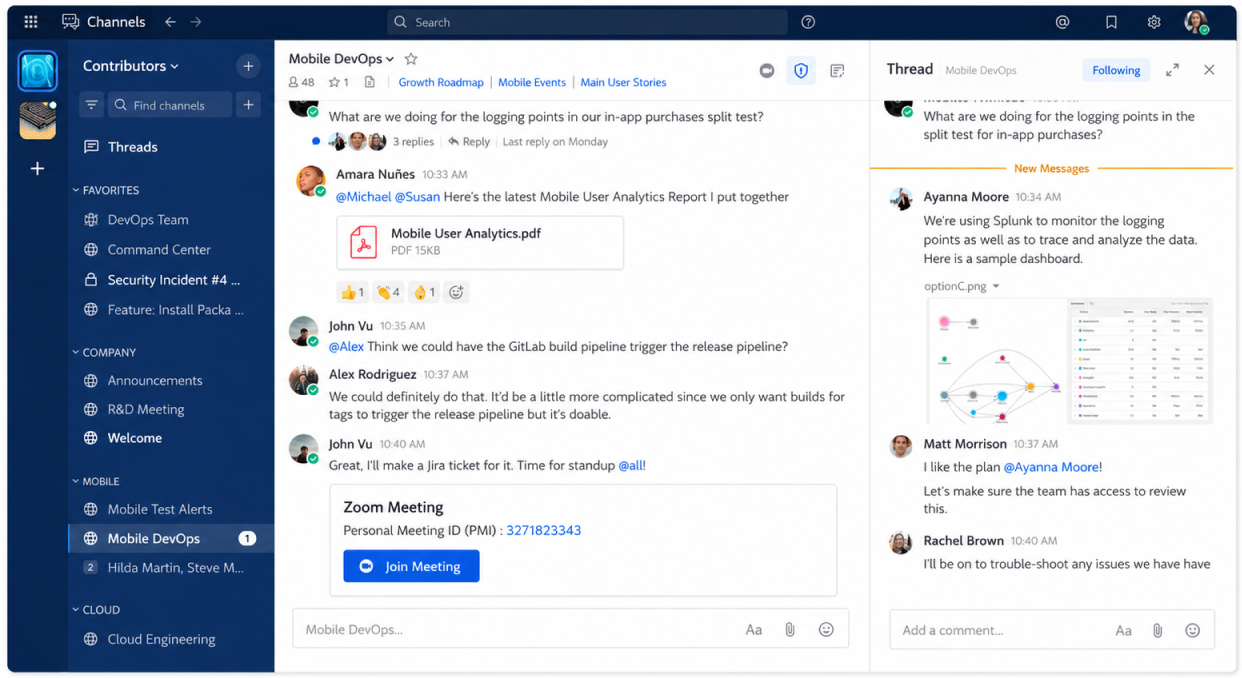
Mattermost is a collaboration platform commonly evaluated by software development, IT operations, and technical teams.
Its channel-oriented communication model supports discussions around projects, incidents, deployments, and operational workflows.
Mattermost can be installed on organization-managed infrastructure, including Linux-based environments.
Key features:
- Public and private channels.
- Direct messaging and threaded discussions.
- File attachments and message search.
- Integrations with developer tools.
- Administrative and identity-management capabilities.
- Self-hosted and air-gapped deployment options.
When to choose Mattermost
Mattermost fits organizations where communication is closely connected to technical operations.
For example, an engineering team can maintain separate channels for application deployments, production incidents, and infrastructure changes.
Instead of distributing operational updates across multiple consumer messaging apps, the team can centralize discussions in a managed environment.
Considerations: Some governance, compliance, and enterprise features require commercial editions. Self-hosting also introduces responsibilities for server maintenance, upgrades, backups, and monitoring.
4. Rocket.Chat: Flexible Self-Managed Messaging
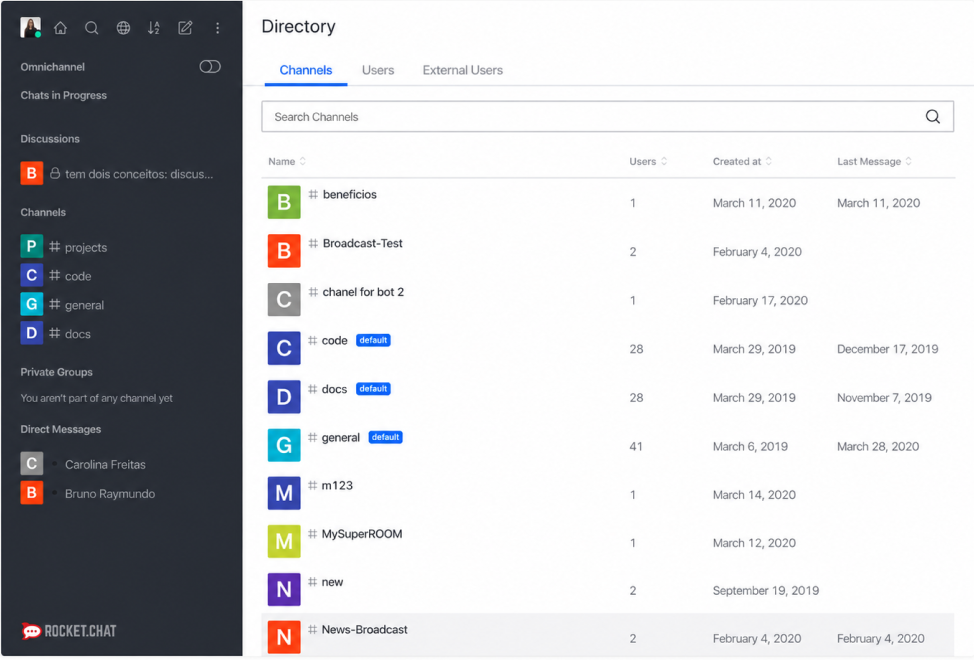
Rocket.Chat provides team messaging with channels, direct conversations, file sharing, and integration capabilities.
Organizations can deploy Rocket.Chat on their own servers using supported self-managed deployment methods.
The platform is particularly relevant to teams that want to customize messaging workflows or connect conversations with other business systems.
Key features:
- Channels, group discussions, and direct messages.
- Searchable conversations and file sharing.
- Integrations and application extensions.
- Self-managed deployment options.
- Administrative controls.
- Enterprise deployment capabilities.
Rocket.Chat currently offers a free Starter plan for self-managed workspaces with up to 50 users. Fully air-gapped deployment is not included in that plan.
When to choose Rocket.Chat
Rocket.Chat is suitable for organizations that need a configurable messaging application and are prepared to manage deployment and integrations.
It can be considered for internal IT communications, operational teams, and business messaging environments where workflow customization matters.
Considerations: Deployment availability and individual features vary by plan. Organizations should verify the licensing requirements for their expected user count and any disconnected-network deployment.
5. Zulip: Structured Messaging for Technical Discussions
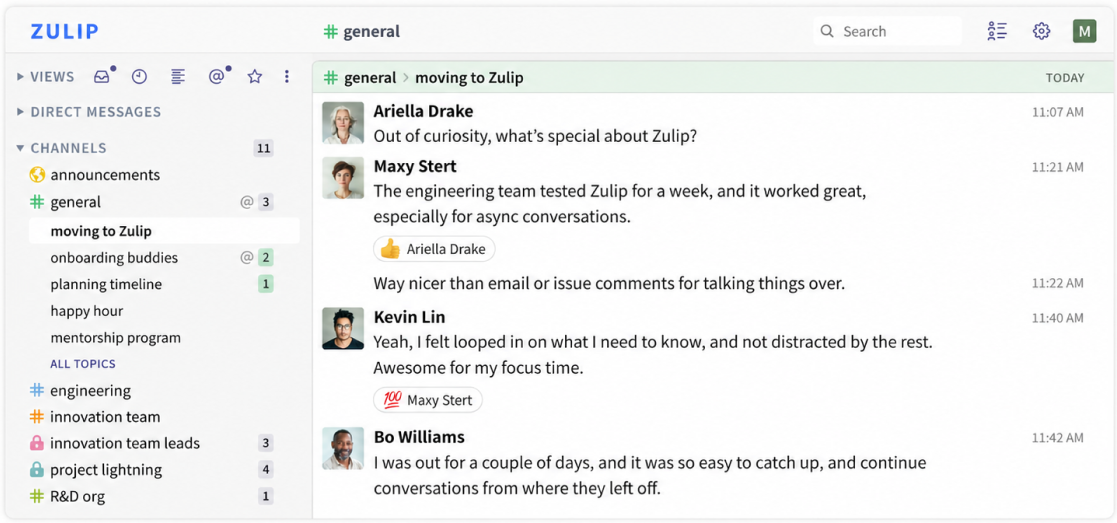
Zulip takes a different approach to team messaging.
Instead of treating each channel as a continuous stream of messages, Zulip organizes conversations into topics within channels. This creates a more structured discussion history.
For teams handling many parallel conversations, topic organization can make older technical decisions easier to locate.
Key features:
- Topic-based conversations inside channels.
- Direct and group messaging.
- Searchable conversation history.
- Integrations and bots.
- Self-hosted installation.
- Open-source software.
When to choose Zulip
Zulip works particularly well for distributed software engineering teams, technical communities, research groups, and organizations where discussions continue over several days.
Consider a development channel containing conversations about API changes, deployment failures, and database migrations. Zulip allows each subject to retain a separate discussion thread without requiring an entirely new channel.
Considerations: Employees accustomed to conventional Slack-style conversations may need time to adapt to mandatory topic organization. Video communication is not Zulip's primary architectural focus.
6. Element: Federated Communication Built on Matrix
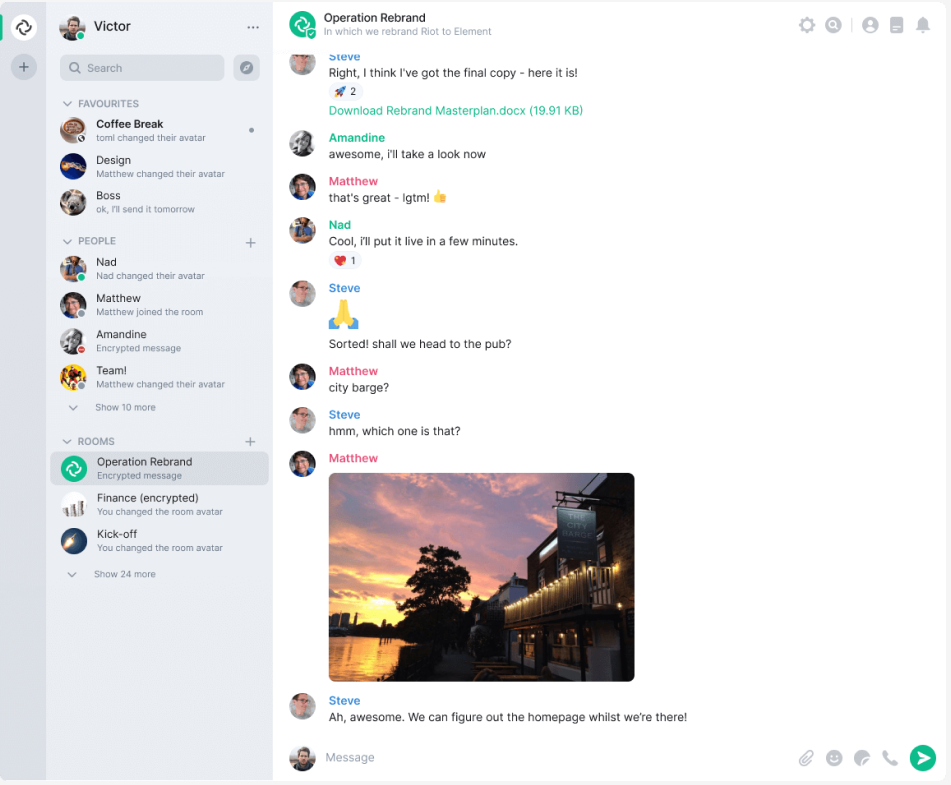
Element is a messaging client and enterprise communication ecosystem built around the open Matrix protocol.
Matrix uses a federated architecture, allowing separate servers to communicate when federation is enabled and appropriately configured.
An organization can operate its own Matrix infrastructure while maintaining control over local server deployment.
Key features:
- Federated messaging through Matrix.
- End-to-end encrypted conversations.
- Self-hosted server options.
- Cross-platform messaging clients.
- Rooms for group communication.
- Enterprise identity and administration options.
When to choose Element
Element is a strong candidate when independent organizations need to communicate without placing all users on one centrally operated messaging server.
For example, multiple research institutions can maintain separate Matrix servers while enabling communication between authorized groups.
Considerations: Self-hosted Matrix deployments require decisions about homeserver software, authentication, federation, encryption key management, and media infrastructure. Advanced calling functionality may require additional components.
7. Nextcloud Talk: Chat Inside a Self-Hosted Collaboration Suite
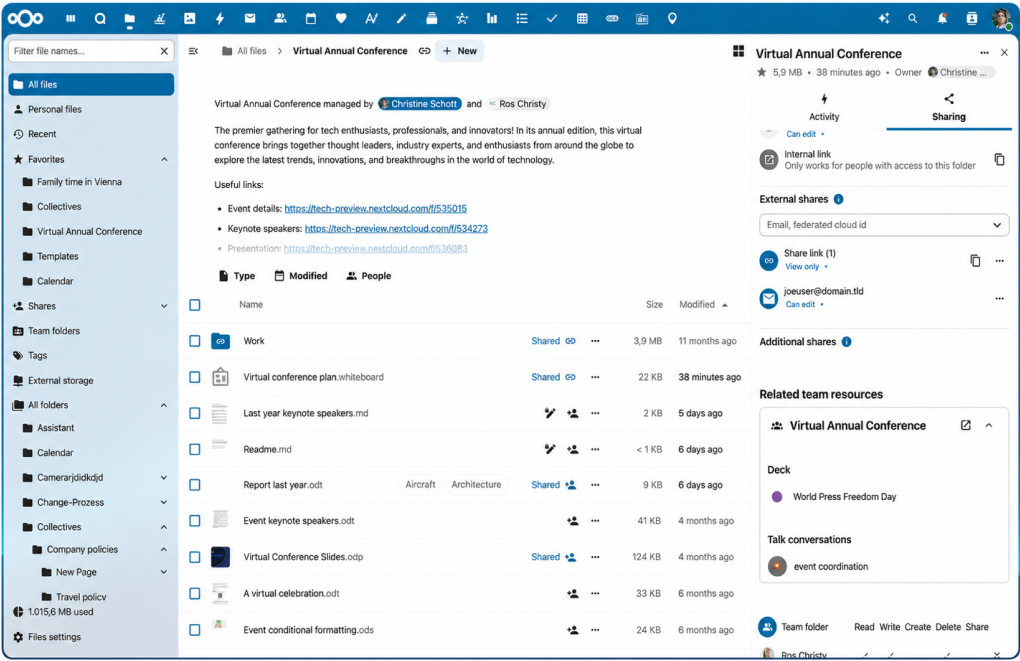
Nextcloud Talk provides messaging, audio calls, and video meetings as part of the broader Nextcloud collaboration environment.
Its strongest advantage is integration with a self-hosted ecosystem that also includes file storage, sharing, and document workflows.
Key features:
- Private and group conversations.
- Audio and video communication.
- Screen sharing.
- Integration with Nextcloud Files.
- Self-hosted operation.
- Administrative controls through the Nextcloud environment.
When to choose Nextcloud Talk
Nextcloud Talk is especially relevant to organizations already running Nextcloud.
Employees can discuss documents and coordinate work without moving between unrelated communication and file-sharing platforms.
Considerations: Organizations that need a dedicated enterprise messenger with extensive standalone messaging integrations may find other platforms more suitable. Larger calling environments may require additional high-performance backend components.
What Does Self-Hosted Chat Software Actually Mean?
Self-hosted chat software is messaging software installed on infrastructure operated by the organization or its infrastructure provider. The organization manages the application environment instead of relying entirely on a vendor-hosted messaging service.
A typical architecture looks like this:
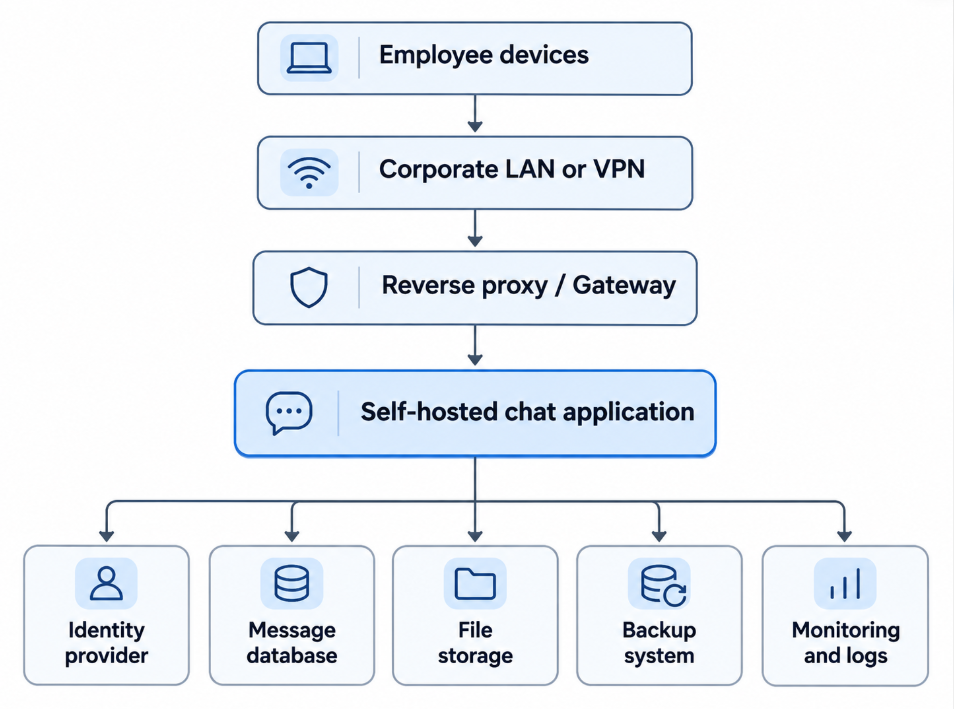
The actual architecture varies by product. Some deployments use a single application server, while others require separate databases, media servers, object storage, or federation components.
The critical point is that moving the chat server into your infrastructure changes who operates the service. It does not automatically solve every security, privacy, or availability problem.
Self-hosted vs. on-premises vs. open source
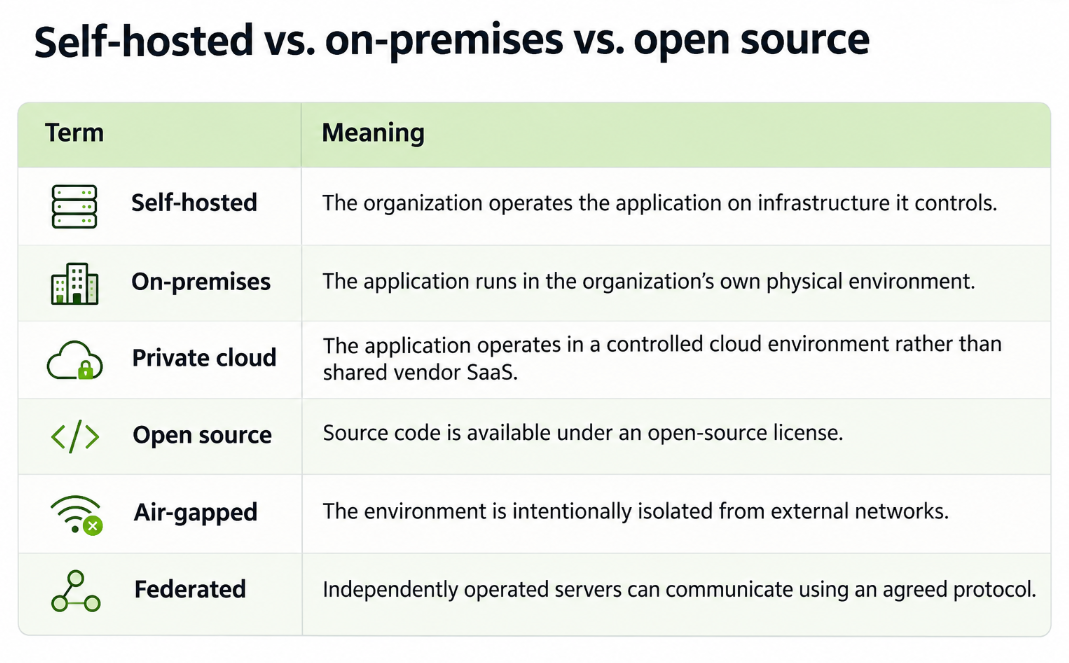
These characteristics can overlap, but none automatically implies the others.
A proprietary application can be self-hosted. An open-source application can be offered only as a managed service in a particular commercial package. A self-hosted server can also depend on external APIs.
How to Choose Self-Hosted Chat Software
Comparing messaging platforms by feature count alone is rarely enough. Five technical questions usually reveal the important differences.
1. Does the platform require internet access?
For ordinary office communication, external internet connectivity may be acceptable. For industrial facilities, isolated government networks, or restricted laboratories, it may be prohibited.
A vendor's claim that software is self-hosted should therefore be tested against specific operations:
- Can employees send messages without public internet access?
- Does authentication work when external identity services are unavailable?
- Are licensing checks dependent on vendor servers?
- Can mobile notifications operate under the network restrictions?
- Do internal calls require external relay servers?
A messaging platform is not fully independent of the internet simply because its database runs locally.
2. Who can access message content?
Infrastructure ownership and end-to-end encryption address different security requirements.
With server-side encryption, the application server may still process message content. With end-to-end encryption, the system is designed so that only authorized endpoints possess the keys required to decrypt protected messages.
These models affect search, compliance exports, recovery procedures, and administrative visibility.
Organizations should inspect the actual encryption architecture instead of assuming that every self-hosted platform provides identical privacy protection.
3. How does authentication work?
Enterprise deployments frequently require integration with existing identity systems.
Important capabilities include:
- LDAP or Active Directory synchronization.
- Single sign-on through supported identity providers.
- Multi-factor authentication.
- Automated user provisioning and deprovisioning.
- Role-based administrative permissions.
A platform should also have a documented process for removing employee access and handling compromised credentials.
4. Is video conferencing a core requirement?
Some organizations need chat mainly for coordinating software development. Others expect employees to move directly from a group conversation into a video meeting.
A standalone chat server with external conferencing integrations may be sufficient for the first scenario.
For the second, an integrated communication platform such as TrueConf Server or a private messaging-and-meetings solution such as Secumeet may reduce the number of separately operated communication applications.
However, integrated video also requires capacity planning for media processing, network bandwidth, and conference concurrency.
5. What will the deployment actually cost?
The software license is only one part of the total cost of ownership.
A useful calculation is:
Total cost = licensing + infrastructure + administration + maintenance + backup + support + security operations
Free software may still require substantial engineering time.
Conversely, a paid self-hosted product can be economically reasonable if it reduces integration work or replaces several independently maintained applications.
Compare the expected cost across several years rather than focusing exclusively on the initial installation.
What Can Go Wrong With Self-Hosted Chat?
The most common deployment mistakes are operational rather than feature-related.
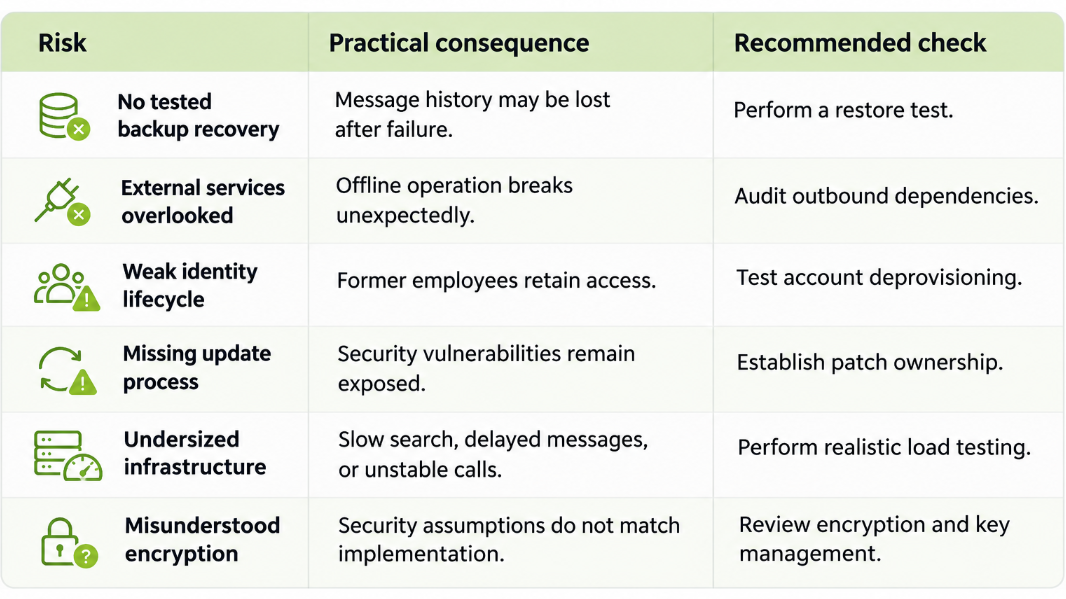
For instance, a company might successfully deploy a chat application inside its LAN, only to discover that mobile push notifications rely on external notification services.
Another organization may install an encrypted messaging platform but neglect endpoint protection, allowing compromised employee devices to expose conversations.
Self-hosting increases operational control, but it also transfers infrastructure responsibility to the organization.
A Practical Deployment Checklist
Before rolling out a self-hosted messenger to an entire organization, test it with a representative group of employees.
The evaluation should include:
- Deployment: Install the server using the intended operating system and infrastructure architecture.
- Identity: Integrate the required directory or authentication provider.
- Messaging: Test private chats, group conversations, attachments, search, and message history.
- Network restrictions: Disconnect external access where relevant and identify which features stop working.
- Security: Review access controls, encryption, logging, and retention settings.
- Recovery: Back up the service and restore it in a separate environment.
- Performance: Simulate expected concurrent users and peak message or conference activity.
- Maintenance: Document upgrades, monitoring, certificate renewal, and support escalation.
A successful proof of concept should demonstrate not merely that messages can be exchanged, but that the organization can operate and recover the service reliably.
Final Verdict: Which Self-Hosted Chat Platform Should You Choose?
There is no universally optimal self-hosted chat application because different platforms solve different communication problems.
Mattermost and Rocket.Chat are useful starting points for teams prioritizing channels, integrations, and operational workflows. Zulip is attractive when long-running technical discussions need consistent organization, while Element is especially relevant to federated messaging.
TrueConf Server serves organizations that want self-hosted messaging alongside enterprise video conferencing, particularly within private or isolated networks. Secumeet is another option to evaluate for private enterprise messaging and integrated meetings. Nextcloud Talk makes sense when communication should remain closely connected to an existing Nextcloud installation.
The most reliable selection method is to start with infrastructure constraints and daily communication workflows, then compare the products against those requirements.
A platform with fewer features but a well-matched deployment architecture may be more useful than a feature-rich application that introduces unwanted dependencies.
Technical references and further reading:
TrueConf Server: Self-Hosted Chat
Secumeet: On-Premise Collaboration Tools
Product capabilities and licensing should be verified against the vendor's current documentation before making a purchasing or deployment decision.
About the author
- Technology writer exploring video conferencing, enterprise communication, and secure collaboration. I share insights on self-hosted software, workplace messaging, communication technologies, and IT infrastructure, helping businesses understand modern digital communication solutions.
Comments
Join the discussionNo comments yet. Be the first to comment.